Monday, 24 May 2010

Friday, 30 April 2010
Q 1 forms and conventions

Our opening does not give alot away, not showing too much of a opening gives more mystery, but alot of the shots gave great indications that something had happend and we would definetly find out if we continued to watch the film, this being similar to the opening of the film "se7en" staring Bradd Pitt. Using over lapping and fading and different effects in our opening it gives a dark and spookey feel, this also comparing to Se7ens opening.
Saturday, 24 April 2010
How one media product can protray a particular sterotype.

Using only a young girl in our thriller opening, it can be used to our advantage to draw in more viewers in many ways. it firstly attracts teenagers, thinking the film will be aimed at their age group being a similar age to the main character, and can relate more to the story. It can also attract to a wider range as more of a chilling film, as young children usually spook people out, and make films far more thrilling.
This can be in comparrison to a character in the film "dont say a word" were actress britney murphy plays a very dark hospital patient, the following photo shows her in costume similar to our main character Jessica. She also has a comparision of using a stuffed toy, this shows signs of a demented child hood we tried to protray that Jessica has a childhood issue that definetly has unfinished buisness.

the sort of audience we were aiming for is 16-25, maybe college students, or unviresity students...someone into clever and intreguing films. A sociable person who loves to discuss films, music and telivison! the sort of girl who takes the trip to cinema with friends, or her boyfriend. Not a demented grunger, but a girl with a darker sence of style and twist in imagination. heres a photo of what her handbag would look like!!

Friday, 23 April 2010
Question 8: Audience Feedback and Comments!
Here are some videos that we took before, during and after the screening:
Harry Kinsley's comment after watching 'Of Unsound Mind'
Michael Lewry's comment.
Francene and Alexandra's comment.
EVALUATION: Q8. Audience feedback and comment

Wednesday, 21 April 2010
Filming on Location

Whilst filming, we had great luck, as the weather was perfect for the scenes we wanted to shoot, with bright sunshine we were able to film clear sunny footage with out rain or cloud. With the chosen location to be outside, there was no problems setting up the tripod, this also kept our star Jessica happy and warm.
A fue problems as you can see in the photo we have taken shooting, is the location became crowded and unfortunatly delayed us filming as we did not want any members of the public in our thriller sequence.
Insparation For Mese En Scene

We also bought a teddy from a local charity shop, to add to the childlike feeling of the coursework. This helped by battering up the teddy to make it look spookier, and to show jess had had it with her a while on her travels of murder, and mystery

. in our Coursework Jess is wearing a hospital gown to show she is an escaped mental patient, or a sick child;. this can be seen in such films like the Sixth sense, or cellular.
skills audit: creation of titles

skills audit soundtrack
 We used a nursery rhyme song 'twinkle twinkle as well as other sounds in soundtrack. It took us some time to choose a component of sound which matched to the soundtrack that we imported from youtube. When we experimented sounds we chose just a simple ' heartbeat' to flow with the 'twinkle twinkle' soundtrack.
Skills Audit Editing

Creating Titles

We were responsable for creating the titles for our thriller sequence. We wanted to create something that matched our footage perfectly, and we found our outcome wos very succesfull.
using the equipment " Live Type" on MAC computers at college, we were able to explore many different
- fonts
- colours
- sizes
- effects
- live effects.
in our filming, our main character (Jessica) wears a blue gown, so our font innitially was ment to be red, but we wanted it to fit exactly. So we changed to a light sky blue, wich we feel matches very nicely.
To make sure they came in suitable orders, we watched the title opening of "panic room" to find wich title should come up when, for example we found it quite rare that the director was shown at the end, instead in alot of big block busters the director is usually shown in the first three titles.
each title lasts a couple of seconds on the screen, some appearing over the footidge at the bottom, or some in suitable places when the screen is blank.
we specifily liked the final title, wich is the title of the film (wich is the only pattern we didnt follow from panic room) it fits lovely with the soundtrack so we felt it would be at peak by showing it at the end on a black background.
Using the live effect called "frigid" this caused our text to move almost as it is vibrating and shaking. This panic, and frantic feel was perfect for our sequence.
After saving each title individually, our other group members (jessica and farhana) placed them carefully were they were suited best on our footidge.
Saturday, 17 April 2010
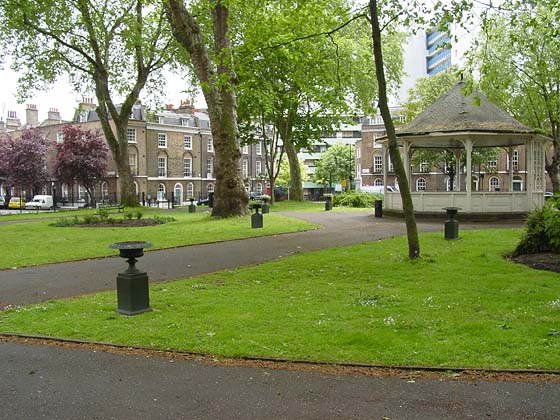
Location Shots:

Thursday, 1 April 2010


Wednesday, 24 March 2010
Inspiration for Our thriller Soundtrack
whilst researching for our soundtrack, we came across a video that was highly suitable for our thriller video, with a female vocal singing "twinkle twinkle little star" it gave our thriller a spooky and chilling atmosphere.
the video also inspired us to add extra shots to our thriller, at the end of the you tube video there is a close up of a woman's face. You will find in our thriller a close up of our main character(Jessica).
http://www.youtube.com/watch?v=menntxDUe4I
Rough cut edit and Changed in Light of feedback from rough cut
The feedback that we recieved from our teachers seeing the rough cut was:
* Not to have many effects, just stick to one to portray one aspect instead of several to make it absolutely clear
* To smooth the connection between one shot to another
* Be better to do more fading shots
and
*to add a soundtrack to have that extra effect on the clip.
We now have to apply this feedback and produce a clear smooth clip of our film.
Thursday, 18 March 2010
Skills Audit: Livetype and Sound
SoundTrack is very similar program as Live type, but it specialises in sound, adding music and noise to footidge. Very helpful for soundtracks or just simple special effects. We will be using this feature to add a heartbeat and piano music to our coursework. It offers other sounds such as up beat and tempo music. it has alot of different ways of expressing sounds and works very well with media work.
Planning Match Cut
with my group, we had to include about 15 shots in our sequence of a character walking through a door with a match cut. me and my fellow group members chose a sequence of Jessica, our group member walking down a hallway and entering a toilet. it then match cut into the toilet were the other character walks out of a cubicle were they both share dialogue before the scene ends.
i think the task was succesful due to our range of shots including
- long shot
- close up
- panning
- over the shoulder
Camera and health and safety Tutorial!
Being shown how to use the tripod, we were taught how to pull out all three legs to a stable possition to hold the camera. Learning how to use the tripod was helpful whilst filming our courswork as we had stable panning and tracking with out having to hand hold the camera wich looks more ammiture.
The video camera was given to us and shown how to use properly so we could use it to its best ability when filming our thriller videos. We were shown how to zoom, look at previous footidge, focus and many more. Whilst using the video camera we were shown how to slot both memmory cards in, and how to slide in the battery.
Finally we learnt how to slide the video camera on top of the tripod, using different clasps for loser tracking, how to bring the camera higher with the tripod to have higher shots. And how to angle the camera.
with our video drive, it allows our group to save all of our work with out being erased or copied by other groups or damaged on the computer. It gives us a better chance of not loosing any work and alot easier.
Health and safety was also taught, for when we are filming with our camera, three basic rules were taught wich were:
- use an umbrella when filming if its raining to protect the camera as they are not waterproof.
- to not touch the lense and leave finger marks
- closing the lense when finishing filming.